Authored by:ChatGPT
Fact-checked & Edited by:Sarah Chen
GitHub Copilot Review (2026): Features, Pricing, Pros & Cons Tested
AI-powered coding assistants have become an essential part of modern software development, and GitHub Copilot remains one of the most popular options available. Since its launch, it has evolved from a simple autocomplete tool into a comprehensive AI coding assistant capable of generating code, explaining functions, writing tests, and helping developers solve complex programming problems.
This GitHub Copilot Review is based on practical testing across multiple programming languages and real-world development tasks. Instead of focusing only on marketing claims, this review evaluates code quality, productivity improvements, supported IDEs, pricing, and overall developer experience.
Whether someone is a beginner learning Python or an experienced software engineer working on enterprise applications, this guide explains whether GitHub Copilot is still worth using in 2026.
What Is GitHub Copilot?
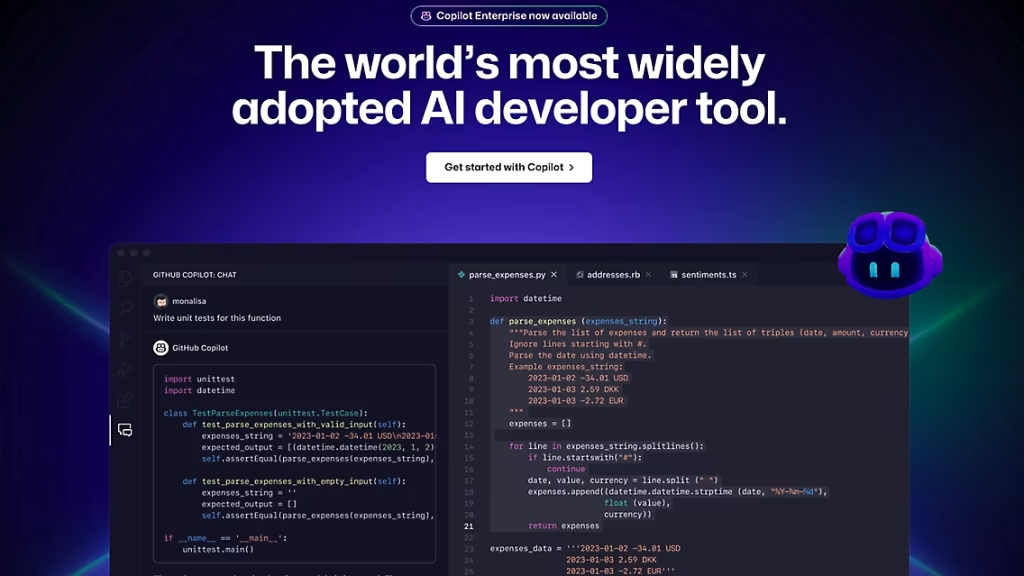
GitHub Copilot is an AI programming assistant developed by GitHub in collaboration with OpenAI. It integrates directly into popular development environments and provides intelligent code suggestions as developers write software.
Unlike traditional autocomplete tools, Copilot understands the surrounding context of a project. It can generate entire functions, explain unfamiliar code, write documentation, suggest bug fixes, and help developers complete repetitive tasks more efficiently.
Today, GitHub Copilot is used by individual developers, startups, and large enterprises to improve developer productivity and accelerate software delivery.
GitHub Copilot Features
One of the biggest reasons developers choose Copilot is its rich feature set. The platform goes beyond simple code completion and assists throughout the development process.
1. Intelligent Code Completion
The most recognizable GitHub Copilot feature is AI-powered code generation.
As developers type, Copilot predicts the next lines of code based on the current file, comments, project structure, and programming language.
Supported languages include:
- Python
- JavaScript
- TypeScript
- Java
- C#
- Go
- Rust
- PHP
- SQL
- C++
This intelligent GitHub Copilot code completion significantly reduces repetitive typing and speeds up routine development tasks.
2. AI Chat for Developers
GitHub Copilot Chat allows developers to ask programming questions directly inside their IDE.
Instead of switching between documentation and search engines, developers can:
- Explain code
- Debug errors
- Generate examples
- Learn new APIs
- Understand frameworks
This makes Copilot more than just a code completion AI tool — it also functions as an interactive coding assistant.
3. Test Generation
Writing unit tests is often repetitive and time-consuming.
Copilot can automatically generate:
- Unit tests
- Integration tests
- Mock data
- Test cases
Although developers should always review generated tests, this feature saves significant development time.
4. Documentation Assistance
Documentation is frequently neglected during software development.
GitHub Copilot can generate:
- Function documentation
- API comments
- README files
- Code explanations
This capability improves maintainability while reducing manual documentation work.
5. Pull Request Support
Copilot also assists during code reviews.
It can summarize pull requests, explain changes, and suggest improvements before code is merged into production.
For development teams, these collaborative features improve communication and review efficiency.
GitHub Copilot Supported IDEs
One of Copilot's biggest advantages is its broad ecosystem support.
Current GitHub Copilot supported IDEs include:
- Visual Studio Code
- Visual Studio
- JetBrains IDEs
- Neovim
- Azure Data Studio
- Xcode (limited workflows)
Because many developers already work inside these environments, setup usually takes only a few minutes.
The deep integration with Visual Studio Code AI workflows remains one of Copilot's strongest advantages.
GitHub Copilot for Developers
The platform is designed to improve productivity rather than replace developers.
During testing, GitHub Copilot for developers performed well across a variety of real-world programming tasks.
Coding Tasks Tested
- Python automation
- React development
- SQL query generation
- REST API creation
- Java backend development
- HTML/CSS layouts
- Debugging
- Refactoring
Copilot handled repetitive coding particularly well, allowing developers to focus more on architecture and problem-solving instead of boilerplate implementation.
GitHub Copilot Performance
Overall GitHub Copilot performance remained consistently strong.
The AI generated clean, readable code and responded quickly inside supported IDEs.
Performance Ratings
| Category | Rating |
|---|---|
| Code Generation | ⭐⭐⭐⭐⭐ |
| Code Completion | ⭐⭐⭐⭐⭐ |
| Debugging | ⭐⭐⭐⭐☆ |
| Documentation | ⭐⭐⭐⭐☆ |
| Learning Support | ⭐⭐⭐⭐☆ |
| Speed | ⭐⭐⭐⭐⭐ |
The assistant performed especially well when completing existing code rather than generating complete applications from scratch.
GitHub Copilot Coding Accuracy
Accuracy is critical for any AI coding tool.
During testing, Copilot successfully generated correct code for many common programming tasks.
Its strongest areas included:
- CRUD operations
- API requests
- Database queries
- Utility functions
- Data transformations
- Common algorithms
However, developers should still review generated code carefully, especially for security-sensitive applications or complex business logic.
No AI assistant consistently produces perfect code without human verification.
GitHub Copilot Pricing
One of the biggest questions developers ask before subscribing is whether the cost justifies the productivity gains.
Understanding GitHub Copilot pricing is important because different plans target individual developers, businesses, students, and enterprise teams.
Free Plan
The free version gives developers an opportunity to experience GitHub Copilot before committing to a subscription.
It includes:
- Basic AI code completion
- Limited AI chat
- Access to supported IDEs
- Core coding assistance
For hobby projects and occasional programming, the free tier is often sufficient.
Paid Plans
The paid plans unlock the complete GitHub Copilot experience.
Typical benefits include:
- Higher usage limits
- Faster responses
- Advanced AI models
- Unlimited AI chat
- Pull request assistance
- Enterprise collaboration features
For developers writing code every day, the paid subscription generally delivers significantly more value.
GitHub Copilot Pricing and Plans
| Plan | Best For |
|---|---|
| Free | Students, hobby developers |
| Individual | Freelancers, professional developers |
| Business | Teams and companies |
| Enterprise | Large organizations |
GitHub occasionally updates its plans and pricing, so users should verify the latest subscription details before purchasing.
GitHub Copilot Free vs Paid
Many developers wonder whether upgrading is worthwhile.
Free Version
The free plan works well for:
- Learning programming
- Small personal projects
- Exploring AI-assisted coding
- Casual development
Advantages:
- No cost
- Easy setup
- Basic AI assistance
Limitations:
- Usage restrictions
- Fewer advanced features
- Lower message limits
Paid Version
Professional developers benefit from:
- More generous usage limits
- Faster responses
- Better AI model access
- Enterprise collaboration
- Improved developer workflows
For developers coding several hours each day, the paid version provides noticeably greater productivity.
GitHub Copilot vs Cursor
One of the most common comparisons today is GitHub Copilot vs Cursor.
Both tools are excellent, but they target slightly different workflows.
| Feature | GitHub Copilot | Cursor |
|---|---|---|
| Code Completion | ⭐⭐⭐⭐⭐ | ⭐⭐⭐⭐⭐ |
| Multi-file Editing | ⭐⭐⭐⭐☆ | ⭐⭐⭐⭐⭐ |
| Repository Awareness | ⭐⭐⭐⭐☆ | ⭐⭐⭐⭐⭐ |
| AI Chat | ⭐⭐⭐⭐☆ | ⭐⭐⭐⭐⭐ |
| Ease of Use | ⭐⭐⭐⭐⭐ | ⭐⭐⭐⭐☆ |
GitHub Copilot Strengths:
- Mature ecosystem
- Reliable autocomplete
- Excellent IDE support
- Fast code suggestions
Cursor Strengths:
- AI-native editor
- Better repository understanding
- Powerful multi-file editing
- More conversational workflow
Which One Wins?
Developers focused on traditional IDE workflows will likely prefer GitHub Copilot.
Those working with large repositories or AI-first development may appreciate Cursor's advanced project awareness.
GitHub Copilot vs ChatGPT
Another popular comparison is GitHub Copilot vs ChatGPT.
Although both use AI to assist developers, they serve different purposes.
GitHub Copilot:
Built primarily for software development. It excels at:
- Code completion
- IDE integration
- Autocomplete
- Debugging
- Pull request assistance
ChatGPT:
Functions as a general AI assistant. It performs well for:
- Explaining algorithms
- Architecture planning
- Learning programming
- Documentation
- Brainstorming
- Debugging complex problems
Which Is Better?
For writing code directly inside an IDE, GitHub Copilot offers a smoother experience.
For discussions, learning, system design, and detailed explanations, ChatGPT provides more flexibility.
Many experienced developers use both together rather than choosing only one.
GitHub Copilot Pros and Cons
Every AI coding assistant has strengths and weaknesses.
Pros
Excellent Code Completion
Copilot predicts code accurately and significantly reduces repetitive typing.
Strong IDE Integration
It integrates seamlessly with Visual Studio Code, JetBrains IDEs, Visual Studio, and several other editors.
High Developer Productivity
Routine coding tasks become noticeably faster. Many developers report spending more time solving problems instead of writing boilerplate code.
Good Documentation Support
Generating comments, documentation, and function descriptions saves additional time.
Beginner Friendly
New programmers can use Copilot to understand unfamiliar syntax and common programming patterns.
Cons
AI Can Make Mistakes
Generated code should always be reviewed before production deployment.
Subscription Cost
Professional features require a paid plan.
Limited Architectural Reasoning
Although excellent at generating code, Copilot is less effective than conversational AI tools for discussing large system architecture.
GitHub Copilot Productivity Review
One of the biggest reasons developers adopt Copilot is improved productivity.
During testing, the assistant consistently reduced time spent on:
- Boilerplate code
- Repetitive functions
- Documentation
- Unit tests
- API endpoints
- SQL queries
Instead of replacing developers, Copilot acted as an AI pair programmer, allowing engineers to focus on design decisions and problem-solving.
For experienced developers, productivity improvements were particularly noticeable during large projects.
GitHub Copilot Review for Beginners
Beginners often hesitate before relying on AI.
Fortunately, Copilot can accelerate learning when used correctly.
It helps beginners:
- Understand syntax
- Complete functions
- Learn APIs
- Practice programming
- Explore frameworks
However, new developers should avoid copying generated code without understanding it. Learning the reasoning behind each suggestion remains essential.
GitHub Copilot Review for Professional Developers
Professional engineers generally benefit the most from GitHub Copilot.
Its strengths become clear when working with:
- Enterprise applications
- Large repositories
- Repetitive coding
- Code reviews
- Documentation
- Team collaboration
Developers still need to review generated code, but Copilot significantly reduces repetitive work.
GitHub Copilot Alternatives
Although Copilot remains a market leader, several strong alternatives exist.
Popular GitHub Copilot alternatives include:
- Cursor AI
- Claude
- Windsurf AI
- Codeium
- Continue.dev
- Tabnine
- Amazon Q Developer
- Sourcegraph Cody
- Blackbox AI
- Gemini Code Assist
Each tool offers unique strengths depending on the development workflow.
Is GitHub Copilot Worth It?
For most professional developers, yes.
GitHub Copilot consistently saves time through intelligent autocomplete, AI chat, documentation generation, and debugging assistance.
Developers who code every day are likely to recover the subscription cost through productivity gains alone.
For occasional programmers, the free plan may be sufficient.
Final Verdict
GitHub Copilot continues to be one of the strongest AI code assistants available in 2026.
Its seamless IDE integration, intelligent code completion, and developer-focused workflow make it an excellent choice for both individual programmers and enterprise teams.
Overall Ratings
| Category | Score |
|---|---|
| Code Completion | ⭐⭐⭐⭐⭐ (9.8/10) |
| AI Chat | ⭐⭐⭐⭐☆ (9.3/10) |
| Debugging | ⭐⭐⭐⭐☆ (9.2/10) |
| Documentation | ⭐⭐⭐⭐⭐ (9.5/10) |
| IDE Integration | ⭐⭐⭐⭐⭐ (9.9/10) |
| Productivity | ⭐⭐⭐⭐⭐ (9.8/10) |
Overall Score: ⭐ 9.6/10
Who Should Choose GitHub Copilot?
Choose GitHub Copilot if you want:
- Fast AI-powered code completion
- Excellent IDE integration
- Better developer productivity
- Strong documentation support
- Reliable coding assistance across multiple languages
For developers who spend hours coding each day, GitHub Copilot remains one of the easiest AI productivity tools to recommend.